What is it?
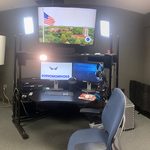
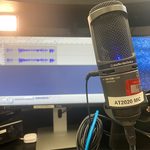
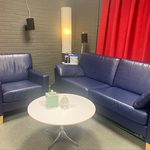
The Finishing Room is a quiet, medium-sized office space in the basement of the Weitz Center, WCC31. It is equipped with a Mac Pro computer with video and editing software, a large flat-screen display, and four quality microphones. The room also includes a high-end 5.1 sound system.
Why is this useful?
The space can be reserved by an Carl for podcast and voice-over recording, screencasting, video conferencing, video and audio editing, and small group meetings.
How Do I Use it at Carleton?
Contact Dann Hurlbert, or any PEPS Staff in WCC28 or WCC30.
- Schedule a session with PEPS staff to get trained on the equipment.
- Reserve the room, which includes getting you OneCard access to the room. (The easiest way to do this is to send your date and time request as an email to peps[at]carleton.edu)
Additional Resources:
CARE Strategies
Need a quick example or description of how one of our tools can be viewed through CARE?
Not sure what CARE is? Please see this blog post on CARE for more information.
Community: Incorporating a Light Board into the classroom demonstrates a commitment to utilizing technology to enhance learning, and engage the classroom community in an authentically, technological way. This can encourage students to explore and suggest other technological tools or platforms that could benefit the class.
Agency: Provides an instructor with an additional way to present information via a recorded video by overlaying handwritten notes.
Representation: Concepts can be visualized and explained with clarity using a Light Board. This clarity can help make challenging material understandable for everyone, but particularly for students who may doubt their abilities due to stereotype threat.
Equal Access: Visual content created with a Light Board can be beneficial for students who enjoy visual representation or have specific learning preferences, making learning more accessible. Incorporating subtitles or captions in recorded sessions, if you do a video overlay, can further enhance accessibility.