Technology Updates
This term’s first Ed Tech Tea focuses on classroom technology: join us September 22, 3:30-4:30pm, in Anderson 121 to explore using wireless presentation, video conferencing, and other options of our existing classroom technology.
These classrooms had AV technology refreshed:
- Boliou 161
- CMC 110, 206, 209, 210, 301 & 319
- Leighton 236, 303, 304, 305, 402 & 426
- Sayles 251 & 253
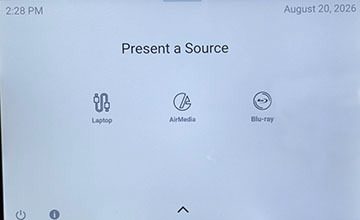
Touchscreens in these rooms have a new look. Improvements to the interface include removing graphical clutter and improving text-to-background contrast.
These computer labs have been updated with new computers:
- LDC 221 (Language Center lab for various uses)
- LDC 242
- All library refreshing lab computers, except Microform machines and 306 instructor station
- WCC 134 (CAMS Advanced Edit)
- Willis Kiosk station
The computer lab LDC241 is now a regular classroom.
Safe Exam Browser
CMC 110, a Windows computer lab, now has Safe Exam Browser installed, a tool that allows for online quizzes in Moodle to be limited to just that one window, making it easier for students to focus on the individual quiz and to support academic integrity. We are developing documentation on how to use the Safe Exam Browser in Moodle and will offer an Ed Tech Tea in Winter ‘27.
Multi-Factor Authentication for Machines in Computer Labs
To increase network security on campus, computers in public labs and classrooms will now trigger Duo, Carleton’s multi-factor authentication (MFA) tool. Please allow students to use their phones to respond to the MFA request.
Research computer labs and instructor computers in computer labs and in classrooms are still exempt from MFA to avoid disruption of research and instruction.